
By Christina Morton
Christina is the founder of The Organizing Company and has been organizing professionally since 2013. She is currently grateful for butterflies hatching, outdoor cafés, and finishing her taxes.
No A.I. copy & paste here! All our blogs are still written by professional organizers or other humans.
Affiliate Disclosure: Some of the links on our website are affiliate links, meaning, at no additional cost to you, we will earn a commission if you click through and make a purchase.
Is it too soon? I know you might still be recovering from the tedious misery that taxes can be. But what if I told you it doesn't have to be that way and that now is the perfect time to set yourself up for easier tax prep next year?
Do this while taxes are still somewhat fresh in your mind. And while that feeling of dread and overwhelm is still fresh in your memory. It'll motivate you to make sure you don't have to deal with that again next year.
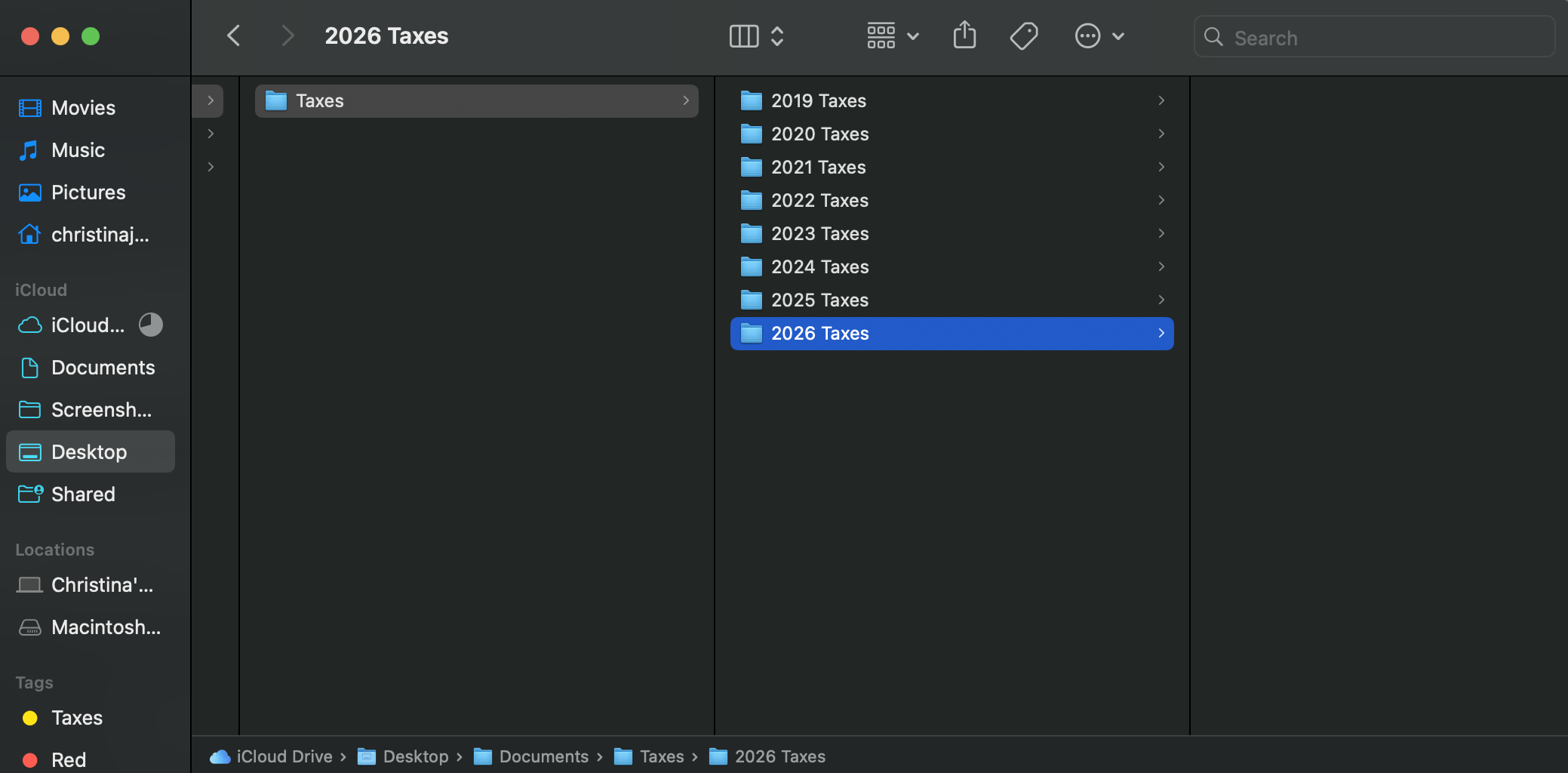
Step 1: Make a “2026 Taxes" folder(s).
If you are totally digital, just create this on your computer. If you like to keep paper documents, create an actual file folder. I have a hybrid system (mostly because of receipts), so I do both. If you only do one though, make it digital and scan any paper docs like W-2s, which is safer storage anyway.
Now that you have this folder created, add any tax related documents you may already have (like your tax prep receipt you paid in 2026 for your 2025 taxes) and start a new habit of immediately dropping tax related documents in this folder. It should collect things year round like:
-Receipts for deductible home improvements and items that qualify for eco initiative credits
-Medical bills/receipts
-Receipts for business/work expenses (such as teachers buying school supplies with your own money)
-Donation receipts for things like thrift store donations or gifts in kind (make sure to jot down notes on it for what you donated and the estimated value)
-Property tax payment receipts
-Tax prep receipts
-Receipts for estimated tax payments made (looking at you, small businesses)
-Car registration/renewal receipts
If finding out how much you spent on medical expenses was a pain this year, start paying for those expenses separately when you're making a purchase somewhere like Target/Amazon, etc. For example, your prescriptions may or may not be deductible, but if they are it's helpful to have them on a Walgreens receipt that is separate from the candy and deodorant you bought at the same time. Or if you order a walker from Amazon, don't do it in the same transaction as the Pine-Sol you're ordering. It'll make your receipts pre-sorted and remove the need for extra math. Of course, you can do the extra math for paper receipts or split a transaction in an accounting software like Quickbooks, but if I find it's usually faster to just do two separate transactions to keep your deductions organized.
Once January rolls around, you'll start receiving W-2s, 1099s, 1095-A, and other tax forms. Immediately add these to your tax folder so they are easy to find. Companies are required to send them out by January 31st (or the following Monday if it's on a weekend) each year, so by the second week in February you should have all the documents you're going to get.
Step 2: Make a list of the things you needed for your 2025 taxes, especially the things that were hard to track down.
This step should be pretty quick for most of you.
This list helps you when it's time to actually do taxes to make sure you have everything you need, but also all year round by training your brain to start putting these things directly in your tax folder (Step 1). You can even refer back to the list every quarter if you're having an unusual year and don't want to forget something.
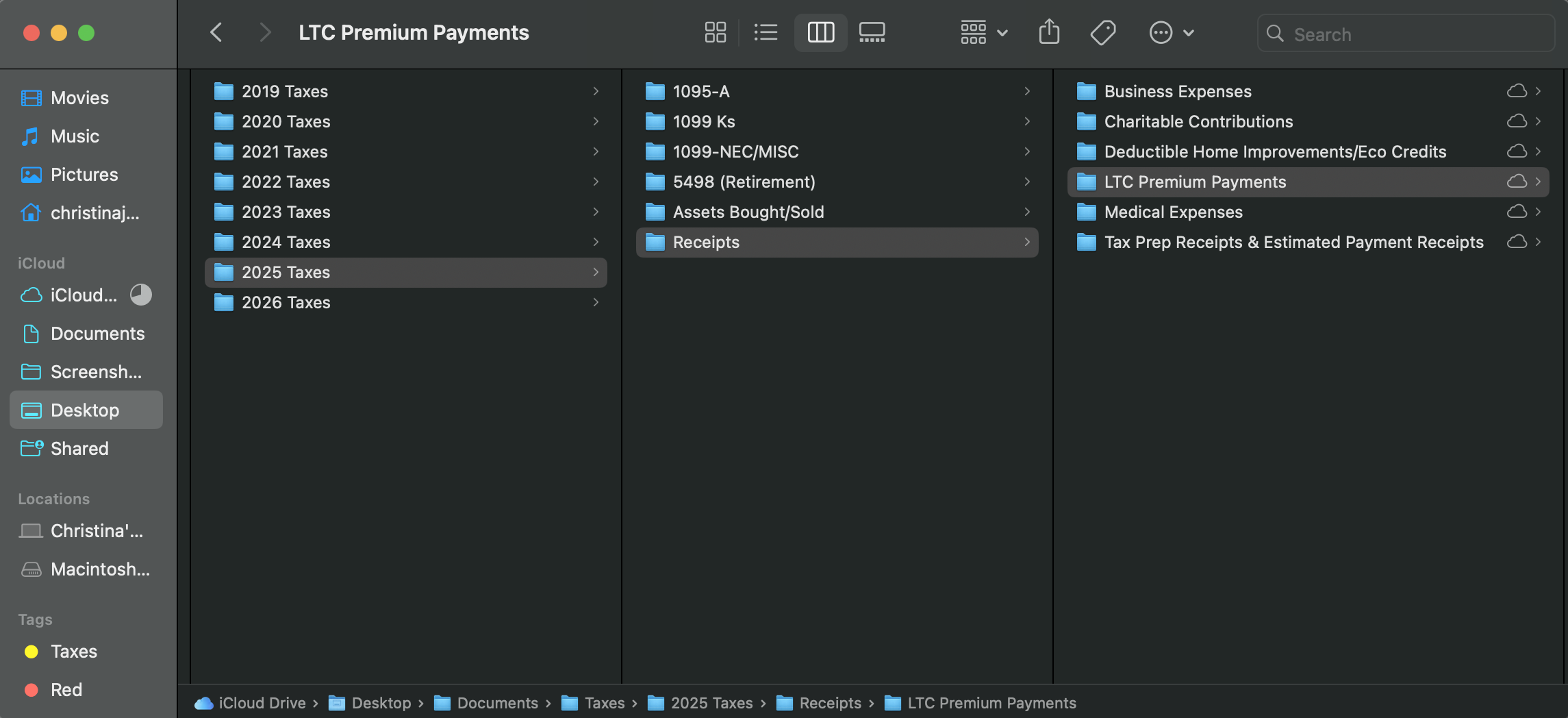
This can be as simple as looking through your 2025 or even 2024 tax folders (digital, physical, or both) to make a list of what items you had last year so it's easier next year (and so you can make a note to start adding them to your 2026 folder as soon as they come in this year). Your list can even take the form of subfolders in your 2026 tax folder, like this example.
We all know the basics of W-2s and 1099s. But what else did you need?
Your CPA likely sent you a Tax Organizer for 2025 to gather most of the needed documents ahead of time, which you can use to make your list for next year and, again, stay on top of gathering/retaining those items as they come in year-round. You don't need to wait until next year to start collecting many of the documents/receipts you'll need!
You also probably had at least a couple things come up beyond the Organizer. Think back to the questions your CPA emailed you or what extra documents they asked you to provide. If you did your taxes yourself, still think of the items that you had to track down. If something was hard to acquire, make a note of how you accessed it or who you had to email to request it.
For small businesses like mine, it's things like your 1099-k for credit card payments you accepted from clients (list all the payment processors you used like Quickbooks, Venmo, Stripe, etc so you don't forget one next year if you start phasing it out or if you don't meet the threshold for them to actually send you a 1099-k); 1095-A for health insurance you get through the ACA Marketplace instead of your employer; utility bills if you deduct your home office, etc. Of course, some of those are things that come at the beginning of next year, but having that list (or empty folders) will remind you to check for things like, “Oh yeah, I had a couple clients use CashApp to pay me, so I should get statements from them," etc.
For personal taxes, also remember to add things to your list like buying/selling assets, cashing out/contributing to retirement accounts (and names of those accounts in case you change them mid-year), long term care policy premium payments, college tuition receipts, etc. Also jot down which charities you donated to last year.
Having this list helps you make sure you can track down required forms if you know you should have received them. Especially if you move during the year.
Step 3: Make a new habit of categorizing your transactions weekly, or monthly at the most.
This especially is life changing for small businesses, but helps in personal situations as well (think back to my medical receipt example earlier).
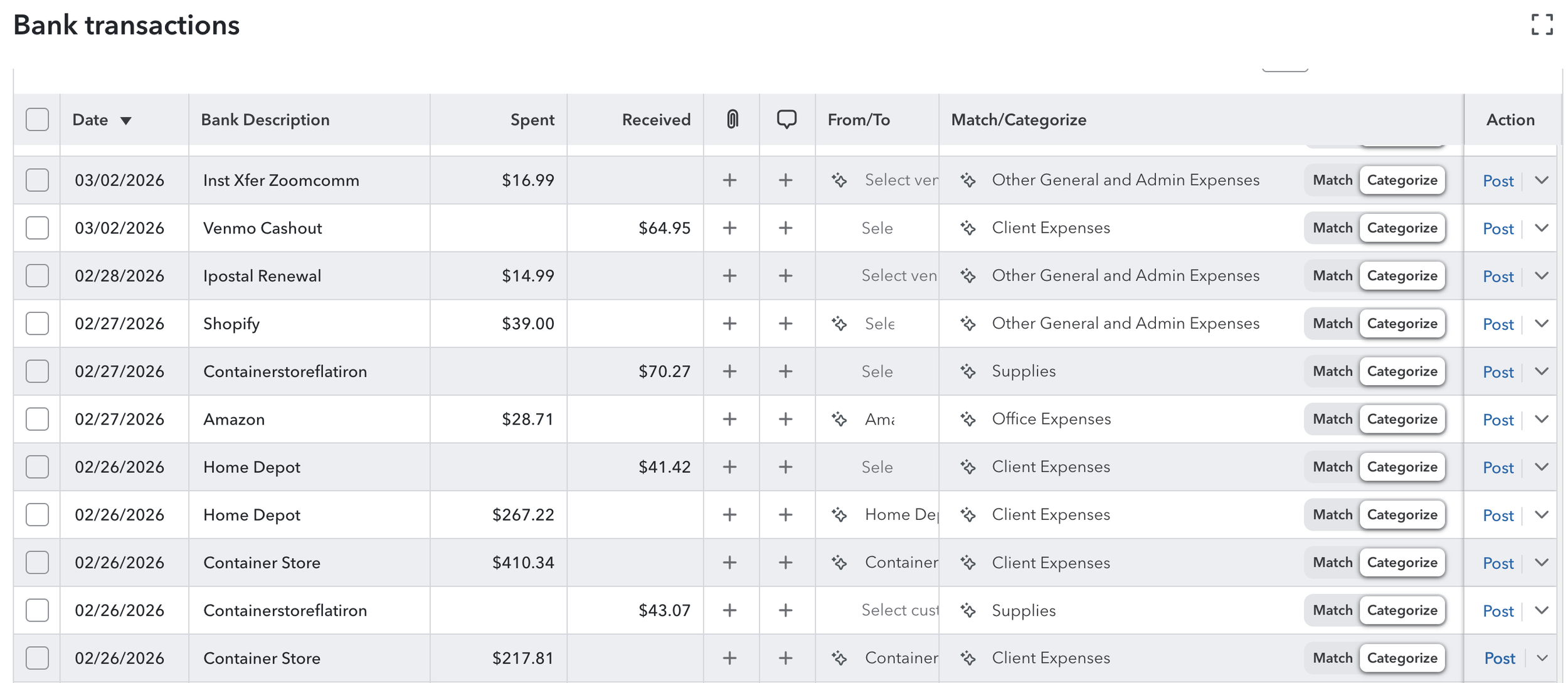
In your online accounting software, go through your transactions (expenses and income/returns) and add/correct the category for each. Adding notes if helpful.
For businesses, you may use Quickbooks, Xero, or Wave. For personal transactions, you may have something like Rocket Money or Monarch or Origin.
These services are great to categorize and sort your expenses so you know how much you spent on each category. That is absolutely essential for small businesses (unless you want a higher chance of an audit...), but for personal use it's really great beyond just the normal budgeting purposes.
Personal uses are things like medical expenses (this is a biggie, hence all the mentions!), long term care insurance premiums, home improvements (look into what types are deductible if you're not familiar), payments to household staff or daycares, purchases and sales of assets (it's easy to forget you sold something smaller), HSA contributions, and purchases of energy efficient items that may get you a credit. Even if you get an end-of-year statement for some of these things, it can be helpful to double check amounts and track down errors.
Just this year I used Rocket Money to show me my charitable contributions and noticed that one charity I donated $1,000 to didn’t send me a giving statement. If I had only gone by what statements I received I would have missed the opportunity to deduct that.
The long and short of it: Categorizing items like these helps you make sure you can get all the deductions and credits you qualify for! At the end of the year, you simply run a report for each category and give those numbers to your accountant/TurboTax. Then they figure out what to do with them. But if you don't give them these numbers, you're probably owing more in taxes than you could be.
Marking your transactions in smaller batches (weekly, bimonthly, or monthly) not only makes it more manageable and less overwhelming, but it also helps you make sure you don't forget something. Every once in awhile, there is something I do that I know won't make sense to me later. Like accidentally using my business card to pay for something personal, or not splitting a transaction that includes deductible and non-deductible items. So categorizing (and splitting) transactions while they are still fresh in my memory means I don't have to do more leg work later trying to figure it out, or worse, miss out on the deduction because I didn't have it categorized correctly.
This is especially important if you buy lots of different types of things at places like Target and Amazon. Categorize what is clothing versus groceries versus deductible expenses right away so you don't have to pull it up later. Speaking from experience, both of their websites will get the job done after the fact, but it takes wayyy more time than just doing it right away.
Plus, categorizing obviously helps you with your budget and seeing where your money is going, whether personal or business. Periodically look at how much you're spending on groceries/clothes/entertainment/eating out/advertising, etc to evaluate if that's in line with your budget/priorities and if it's having the ROI you hoped for. It can be pretty sobering, and why wait until the end of the year to catch something getting out of hand?
Last quick tip on this: Apps like Rocket Money and even Quickbooks make it pretty fast to categorize things (or confirm transactions under rules you create), so sometimes I like to do it while I'm waiting in line or early to an appointment. Instead of playing a game or scrolling Instagram, take 5 minutes and categorize a few things. It makes it more manageable and you'll thank yourself (and maybe me) later!
So it's really that simple: Start a folder, make a list, and categorize your transactions more frequently.
These things really made a difference for me personally as I started implementing them over the years and I'm proud to say this was the easiest year of tax prep I've had since leaving a simple W-2 tax situation 13 years ago.
Now is the time of year to start putting these things into practice. Your 2026 taxes will be a breeze, friend.
Happy Organizing!
Christina
PS: ICYMI, I shared about my Reflect & Refocus Goals Journal recently, and it has a section for setting goals for your finances. If you want to prioritize your budget for the rest of the year and get in control of your finances, check it out here.
April 16th, 2026
Share & Follow
